Complying with ADA guidelines enables your website to provide a better user experience for millions of Americans, opens up your business to more potential clients, and helps you to avoid possible legal action against your firm.
What is the Americans with Disabilities Act (ADA)?
The ADA, enacted in 1990 and amended in 2009, aims to protect people with disabilities by mandating businesses to support the former’s needs. It also ensures that everyone has access to equal opportunities and isn’t discriminated against in jobs, public access (including access to websites), mobile applications, and other digital information.
Because of this mandate, if your firm has a public facing website, it needs to meet ADA website compliance requirements or face possible legal/financial consequences.
ADA Compliance Data:
- 300% increase in lawsuits and demand letters from 2018 to 2019
- Estimated 265,000 demand letters sent in 2020
- 93% of demand letters are settled outside of court for an average of $20,000 – $150,000
What Is ADA Website Compliance?
ADA website compliance refers to a requirement that people with disabilities enjoy equal access to public services, like those offered on your website.
People with disabilities are usually described as those with a physical or mental impairment that limits one or more major life activities.
Moreover, certain core principles from the Web Content Accessibility Guidelines (WCAG) 2.0 level must be followed to make a website compliant with ADA.
These principles include:
- Perceivability: The website should be presented in a way that people with disabilities can easily perceive all information on the platform.
- Operability: The website should allow users to navigate the platform and use all its features without any hassle.
- Understandability: Your website should allow the users to easily access the content and understand the language used in it.
- Robustness: Your website should have the ability to provide the same experience for all users, even with the use of assistive technologies.
How To Make Your Website ADA Compliant?
Now that you’re familiar with ADA website compliance, it’s time to know how you can make your WordPress website accessible to everyone, including people with disabilities.
Below are some tips for making your website ADA compliant:
1. Observe The Best Practices For Creating ADA Compliant Website Content
The following are some of the best content creation practices to ensure compliance with the ADA:
Use high-contrast colors:
Make it easier for users to read the website’s content. In most cases, poor contrast or combination of colors can’t be processed by individuals with color blindness and other similar disabilities.
Pick a clear, standard font:
Choose a font that can be processed by a screen reader. Don’t use a font that:
- makes content more difficult to read
- has overlapping characters or letters
- are decorative
- are display fonts such as hand-writing style or cursive
- is too small
In addition, avoid using characters that do not appear on a standard keyboard (i.e. Unicode characters).
i.e. Emoticons – these are the faces made from regular letters and punctuation symbols like a colon, dash, and bracket are used to make a smiley face. However, readers can read Emojis, the actual picture of the smiley face, because they include the alt. text that explains what the image is.
Option to Resize Text
Ensure the website allows users to resize texts to a certain level without causing site malfunctions or loss of content.
Captions
Provide captions to all live and pre-recorded videos and audio presentations.
Alt. Text
Use descriptive alt. text for all images on your website. That way, screen readers can adequately describe the content to someone with a visual impairment.
Headings
Use headings and labels to clearly explain or describe the purpose of the content.
2. Provide a Keyboard Navigation Option
Many users with disabilities are unable to use a standard mouse for navigation of your website. Keyboard navigation provides an alternative way to move around your site.
3. Offer Alternatives to Video or Audio Content
Use captioning on video and offer a transcript for audio based content.
4. Test All Forms on your Website
Screen readers struggle with many forms. Labels need to be clearly identified and must provide visual cues when information is required.
5. Avoid flashing Content
Flashing content can induce seizures and other physical reactions in some individuals so should be avoided or controlled.
Test Your Site for ADA Compliance
There are several online tests that will help you to check and improve your ADA compliance. I recommend running your site through WAVE Web Accessibility Evaluation Tool which will help identify any incidences of non-compliance.
Our ADA Compliance Solution
We’ve partnered with 3rd-party experts in Web Accessibility. Their technology and know-how make achieving accessibility easy and painless. You can see their software on our site by clicking the orange “wheelchair” graphic located in the bottom right-hand corner of our website. The dashboard that appears provides individual controls to adjust the website to accommodate their needs.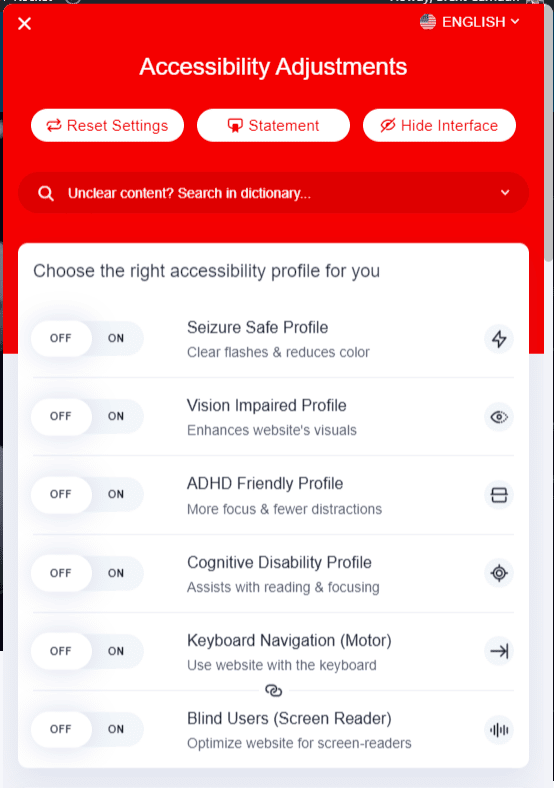 In addition, Litigation Support is offered. Should you still receive a demand letter, your support includes:
- Compliance Audit
- Compliance Overview
- Accessibility Statement
- Suggested Response
Please schedule a meeting or contact me for more information or to get you set up.
Standard
$ 490/yr or $49/month- For websites under 1000 pages
Large
$ 1490/yr or $149/month- For websites with 1001 - 10,000 pages
Huge
$ 1990/yr $199/month- For websites with 10,000 - 99,999 pages